Why I Used AI to Build a POD Go to Helix Preset Converter
I was excited to bring my Gold Helix to the other guitarist’s house. I’d just joined his band, and he already had the sounds dialed in on his POD Go. I’d found a great deal on the Helix. It was beautiful, it had XLR outputs, and I could drop my guitar a half step without bringing another pedal. One of my favorite things was simpler than any of that. I could read the little screens above the footswitches without my glasses.
The plan was to share presets and play guitar. He’d already spent hours getting those sounds right. We downloaded HX Edit and picked up the layout pretty quickly. Then we got to the actual work of recreating the patches.
We had to figure out which blocks were mono and which ones would work on the Helix. A snapshot is a saved variation within a preset. It can change a few settings or turn effects on and off without switching presets. We’d dial in a setting, switch snapshots, and realize we’d forgotten to make the change specific to that snapshot. Then we’d go back and do it again. We spent a couple of hours on it. I work in technology. I’m comfortable with code and JSON. If I was spending this much time jumping between screens, I could imagine how it felt for a guitarist who just wanted to play.
It happened again when I joined another band. That guitarist also had a POD Go, and we had roughly 60 presets with two to four snapshots each. We had a show coming up, and I wanted to spend our time rehearsing. I bought a POD Go so we could use the same presets. I also bought a separate pedal to drop my pitch, something I could already do on the Helix.
That second band made the cost of the problem clear to me. With a converter, I could have tried his presets on the Helix I already owned and potentially saved myself the extra gear and hours of editing. We already had the sounds. Could I move them to my rig without rebuilding them one by one? That question became PresetFerry.
Rethink how to build it
Before I started working with AI on the converter, I looked into training a machine-learning model to find patterns in the preset files. I expected that approach to take more time and money than I wanted to put into the project. Then I saw a way to use AI as part of the development work itself. I could work with it to build the rules for mapping one device’s settings to the other, then test those rules on real backups and revise them as we found problems.
See what AI can help you test
My first question was whether I could work with AI to interact with the actual devices. I wanted to handle imports and exports without manually going back and forth between the POD Go and Helix editors every time I tried a conversion. I had space on the Gold Helix, so I used it as my destination for testing converted patches.
I started with a backup I already had from playing in the band. When I got a newer backup, it exposed more errors. That was a good reason to build a workflow I could run over and over. I set up logging and reports so I could see what happened in a batch, work through the errors, and run it again. Test, repeat. I could work through a lot of the problems before I even picked up my guitar.
Play the patches you know
Once the conversion runs stopped showing errors apart from the impulse response warnings, I imported the converted patches and grabbed my guitar. The backups came from my old band, so I knew which patches were sensitive to changes. I played through them and couldn’t find anything I needed to fix. I sent the converted files back to my former singer. He loaded them, tried them out, and told me he was impressed. He also shared our work with some Helix groups, and we got feedback from other players.
I couldn’t find a case where the impulse response warnings affected the patches I tested. That was one reason I wanted a public beta. Other players would bring presets and setups I hadn’t tried.
Help people decide what to check
The server running PresetFerry doesn’t have a POD Go or a Helix plugged into it. It works from the files you upload. I wanted its report to help you decide what to check when you load the converted presets on your own rig.
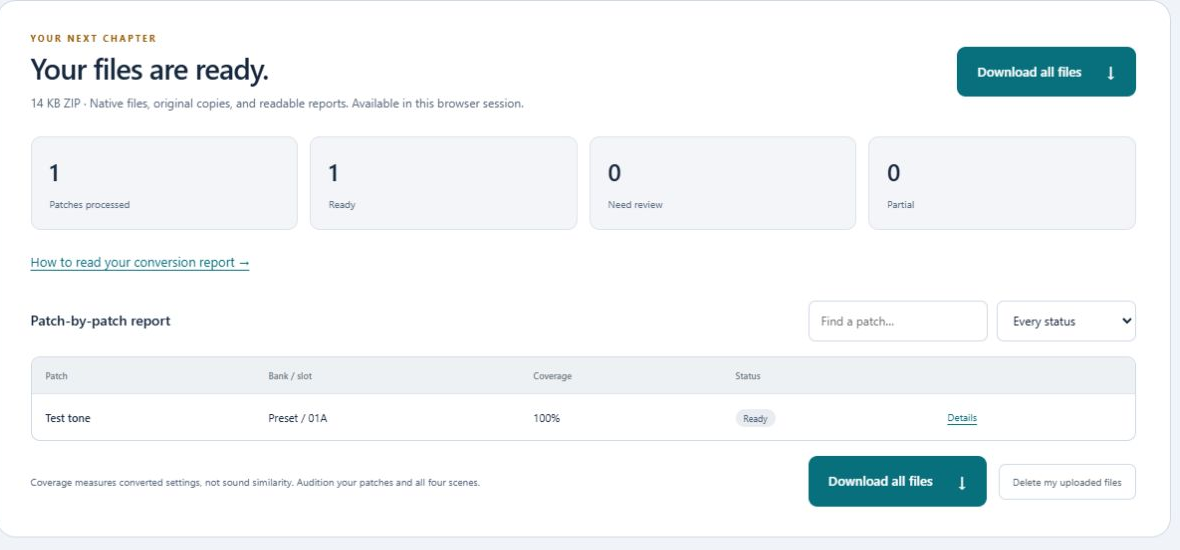
In one browser test, the converter marked 240 presets ready and flagged eight for review. My goal was to save people from having to play through all 248 by hand. Try a few to get a feel for how the conversion went. If you’re getting ready for a show and want to know where to spend your time, check the flagged presets you plan to use. They might play fine as they are. If something does need a tweak, the report gives you a place to start.
When I catch myself rebuilding something that already exists, I pay attention. With the first band, it cost us a couple of hours. With the second, the same problem sent me shopping for gear before a show. That was enough to make me ask what I could reuse, what AI could help me test, and how I would know if the result worked. For PresetFerry, the last part meant loading the patches onto my Helix and playing songs I already knew.